
The Conditional and Comparison functions evaluate conditions and compare values.
This function accepts a condition and a string value X. It compares the given condition; if the condition is true, it returns the value provided in X.
Syntax:
| process eval("identifier=if(condition) {return X}")
Example:
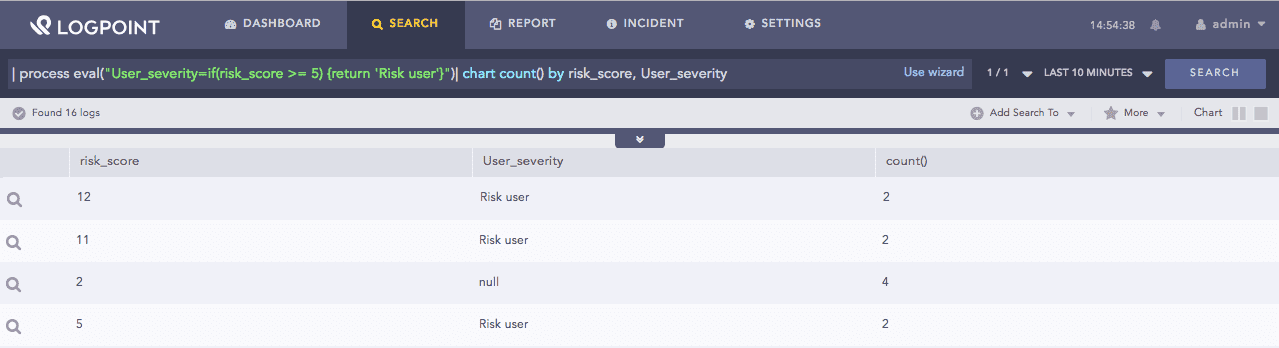
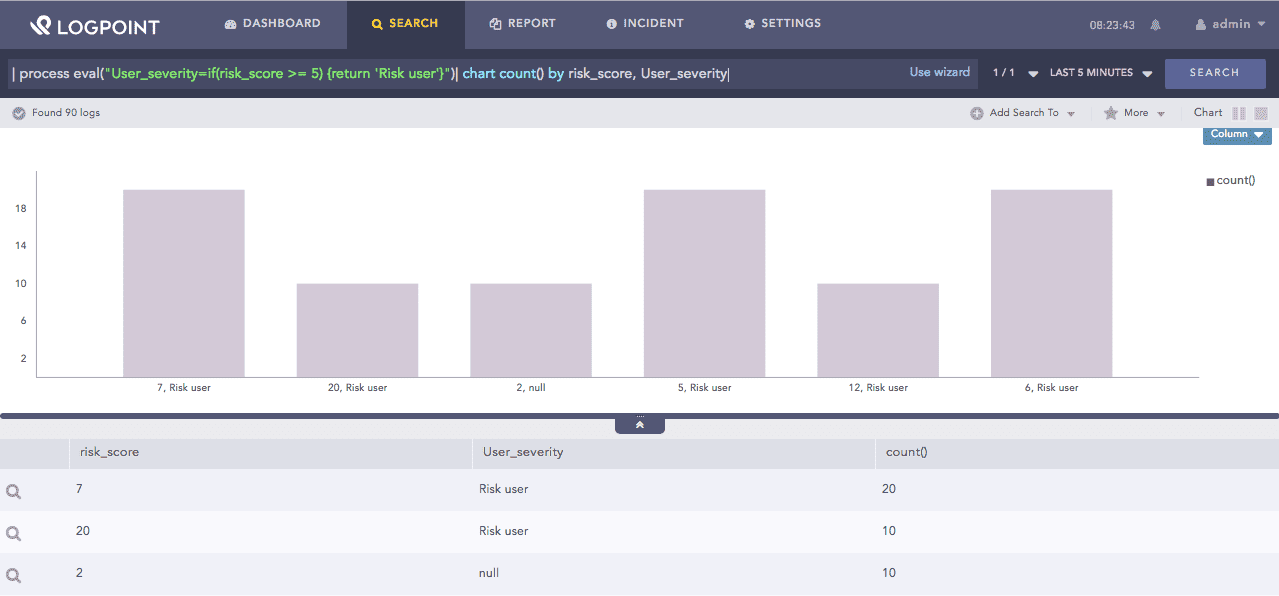
| process eval("User_severity=if(risk_score >= 5) {return 'Risk user'}")
| chart count() by risk_score, User_severity
The above example returns Risk user in the User_severity identifier if the value of the risk_score field is greater than or equal to 5.
The chart count() command displays the count of the combination of risk_score and User_severity values as a chart and in a tabular form.
If statement function
This function accepts a condition and two strings X and Y. It compares the given condition; if the condition is true, it returns X, else returns Y.
Syntax:
| process eval("identifier=if(condition) {return X} else {return Y}")
Example:
| process eval("is_profitloss=if((Selling_price%cost_price) == 0)
  {return 'No profit/loss'} else {return 'profit/loss'}")
| fields Selling_price, cost_price, is_profitloss
The above example checks if the remainder value when Selling_price field is divided by cost_price field is 0. It returns No profit/lost in the is_profitloss identifier if the condition is true, else returns profit/loss.
The fields command displays the value of Selling_price, cost_price, and is_profitorloss in a tabular form.
If-else statement function
This function accepts one or more alternating conditions and values. It compares the condition with the following order.
if the first condition is true, it returns the value provided in X,
else compares the second condition; if the second condition is true, it returns the value provided in Y,
else returns the value provided in Z.
Syntax:
| process eval("identifier=if(condition){return X} else-if(condition) {return Y} else { return Z}")
Example:
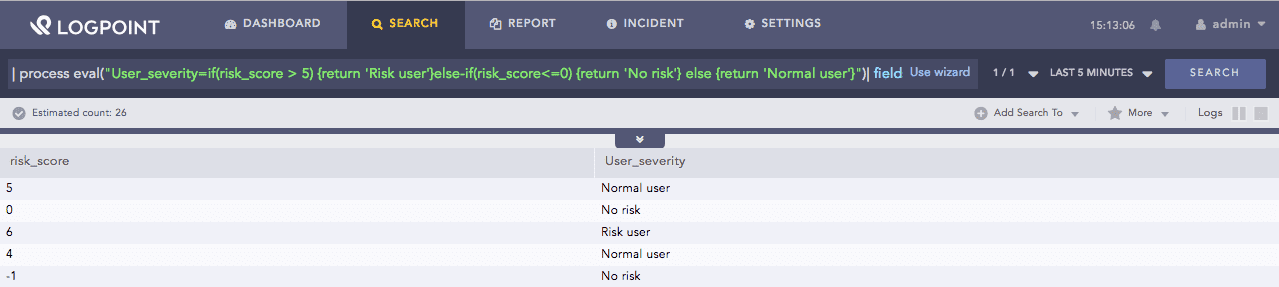
| process eval("User_severity=if(risk_score > 5) {return 'Risk user'}
  else-if(risk_score<=0) {return 'No risk'} else {return 'Normal user'}")
| fields risk_score, User_severity
The above example checks if the value of the risk_score field is greater than 5. It returns Risk user in the User_severity identifier if the condition is true, else it compares the second condition, i.e., it checks if the value of the risk_score field is less than or equal to 0 and returns No risk if true. If both of these conditions is false, it returns Normal user.
The fields command displays the value of risk_score and User_severity in a tabular form.
If-elseif-else statement function
This function accepts one or more alternating conditions and values. It compares the condition with the following order.
if case_one matches the value of the data, it returns the value provided in X,
else checks if the case_two matches the value of the data; if the condition is true, it returns the value in Y,
else returns the value in Z by default.
Syntax:
| process eval("identifier=switch(data) {case(case_one) {return X}
  case(case_two) {return Y} default {return Z}}")
Example:
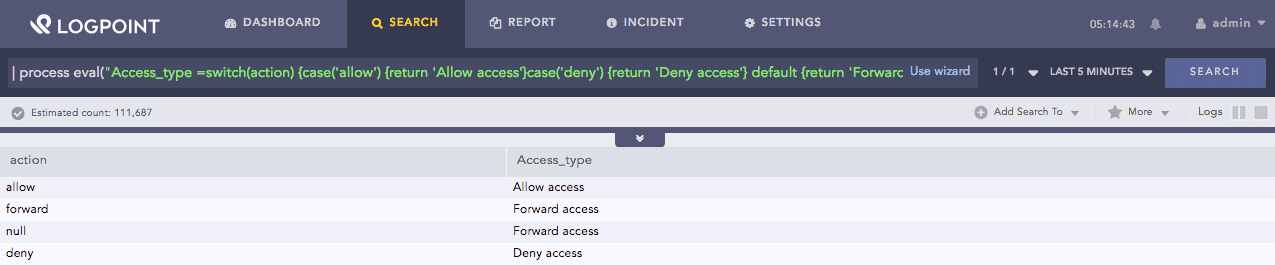
| process eval("Access_type=switch(action) {case('allow') {return 'Allow access'}
  case('deny') {return 'Deny access'} default {return 'Forward access'}}")
| fields action, Access_type
The above example returns Allow access in the Access_type identifier if the the value of the action field is access; Else if the value of action is deny; it returns Deny access, else it returns Forward access by default.
The fields command displays the value of action and Access_type in a tabular form.
Case statement function
This function accepts two arguments, a CIDR (Classless Inter-Domain Routing) notation, and an IP address. It returns True if the IP address matches the CIDR notation, else returns False.
Syntax:
| process eval("identifier=cidrmatch(CIDR, IP)")
Example:
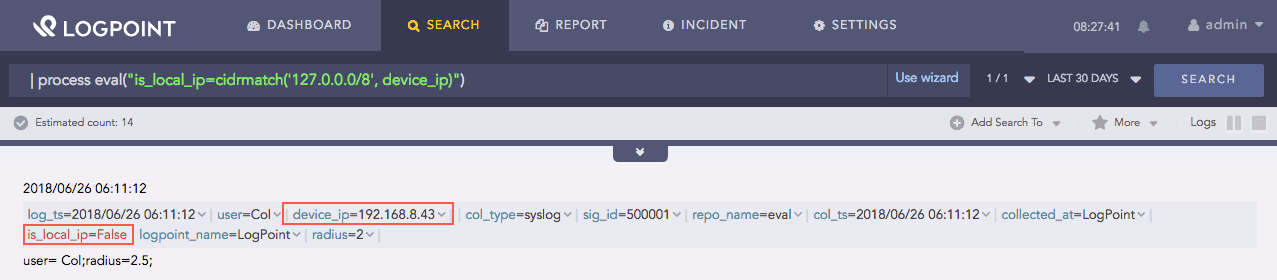
| process eval("is_local_ip=cidrmatch('127.0.0.0/8', device_ip)")
The above example returns true in the is_local_ip identifier if the value of the field device_ip matches the CIDR notation 127.0.0.0/8, else returns false.
Cidrmatch function
This function accepts an arbitrary number of arguments as inputs and returns the value of the first argument that is not null.
Syntax:
| process eval("identifier=coalesce(X,Y,...)")
Example:
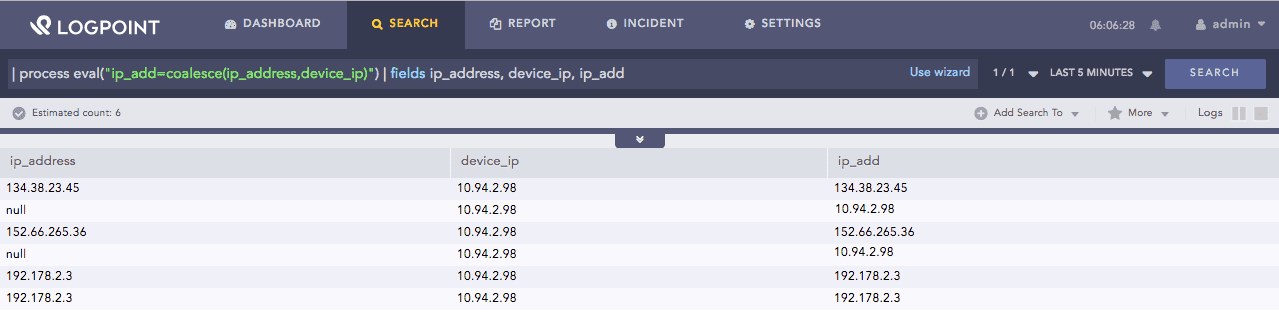
| process eval("ip_add=coalesce(ip_address,device_ip)")
| fields ip_address, device_ip, ip_add
The above example returns the value of the ip_address field in the ip_add identifier if the its value is not null. If null, it checks the value of the device_ip field. If the device_ip field is not null, it returns its value in the ip_add identifier .
The fields command displays the value of ip_address, device_ip, and ip_add in a tabular form.
Coalesce function
This function returns False. The false function in combination with other functions represents a condition that is undoubtedly false, i.e., 1==0. Unlike other functions, this function does not take any argument.
Syntax:
| process eval("identifier=false()")
Example:
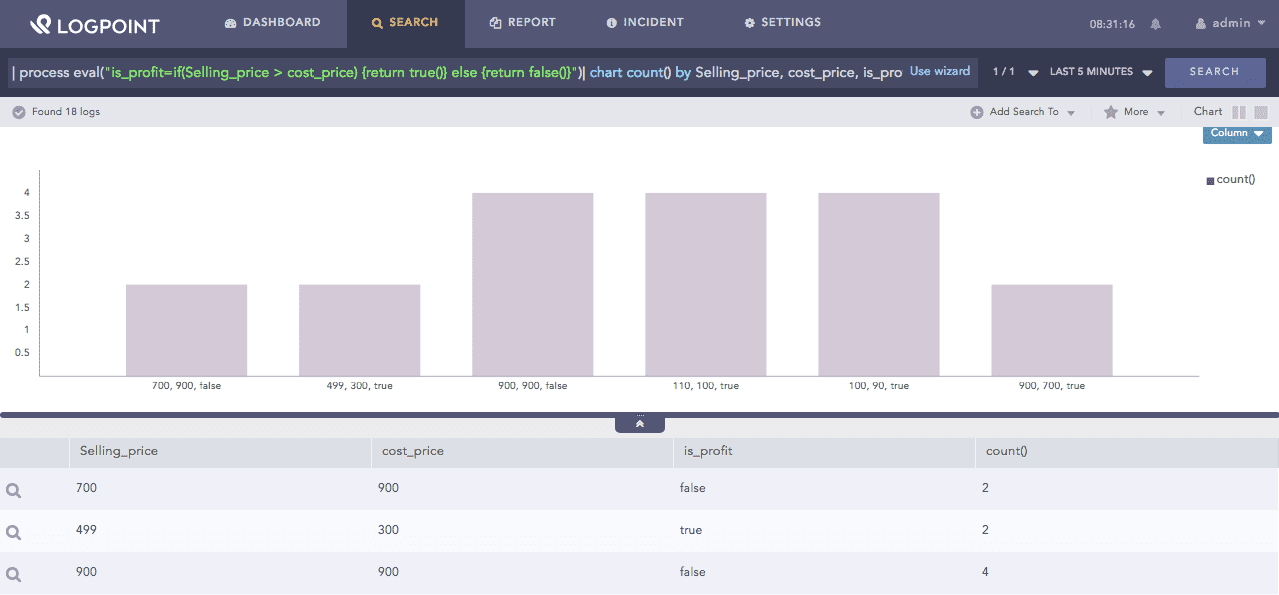
| process eval("is_profit=if(Selling_price > cost_price) {return true()} else {return false()}")
| chart count() by Selling_price, cost_price, is_profit
The above example checks the value in the Selling_price and cost_price fields. It returns true in the is_profit identifier if the Selling_price is greater than the cost_price, else returns false.
The chart count() command displays the count of the combination Selling_price and cost_price values as a chart and in a tabular form.
False function
This function accepts a field of an event and a list of string values. It returns True if one of the values in the list matches the value specified in the field, else returns False.
Syntax:
| process eval("identifier=in(field, value1, value2, value3, ...)")
Example:
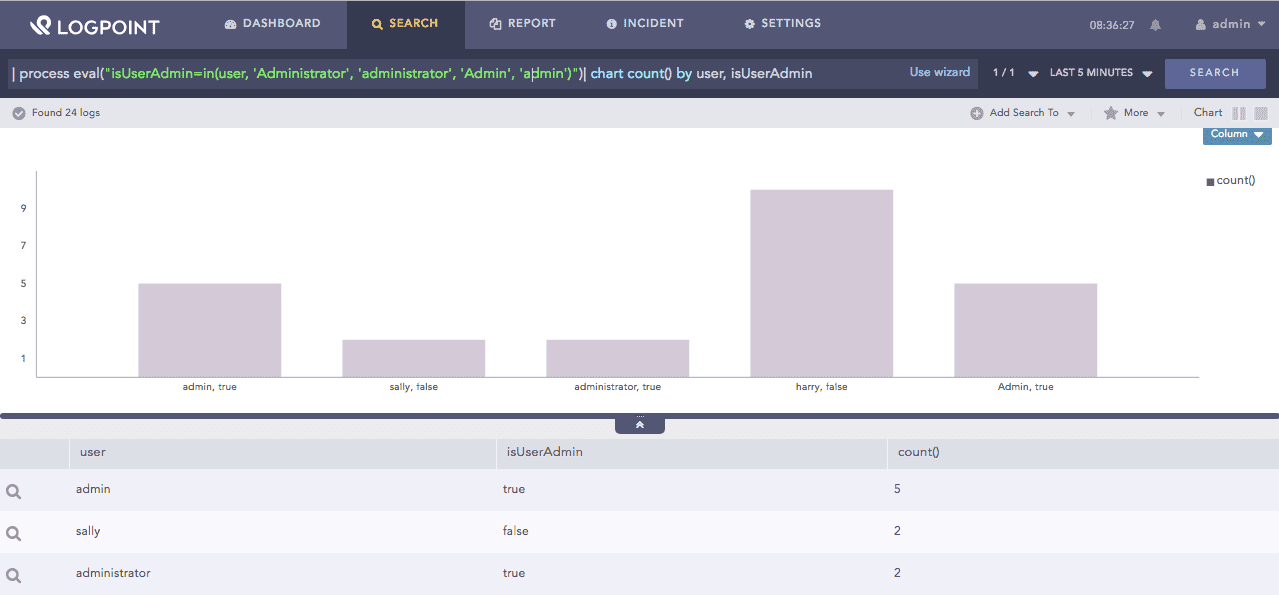
| process eval("isUserAdmin=in(user, 'Administrator', 'administrator', 'Admin', 'admin')")
| chart count() by user, isUserAdmin
The above example returns true in the isUserAdmin identifier if the value in the user field matches with any one value in the list, i.e., Administrator, administrator, Admin, and admin, else returns false.
The chart count() command displays the count of the combination of user and isUserAdmin values as a chart and in a tabular form.
In function
This function accepts a text field X and a regex (regular expression) string. It returns True or False based on whether the given regular expression finds a match against any substring of the text in the field X.
This function also returns True if the text in regex string exactly matches the text in the field X.
Syntax:
| process eval("identifier=match(X, regex)")
Example:
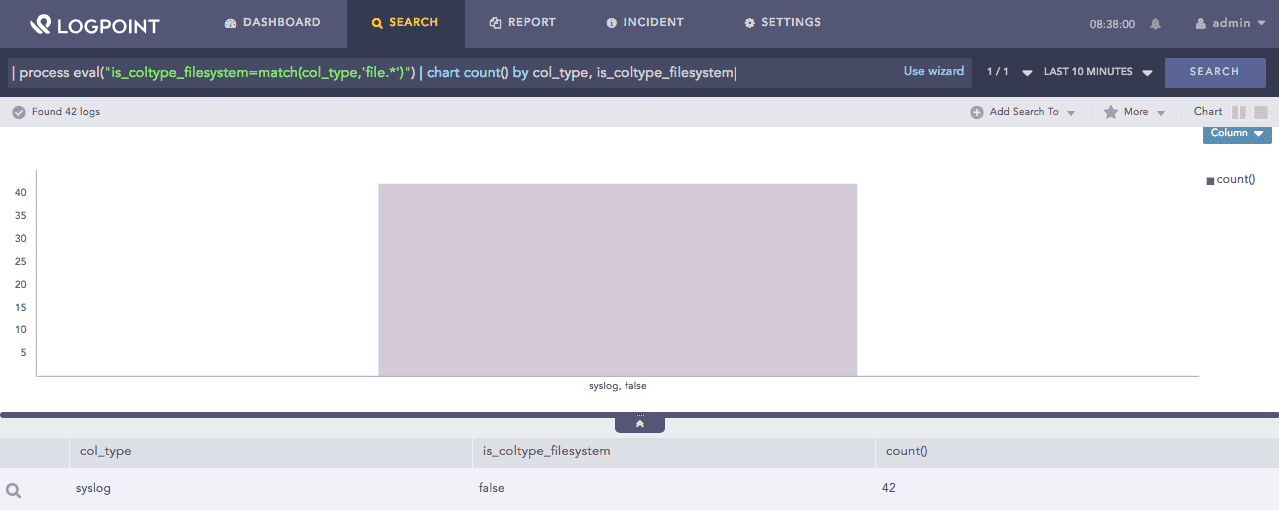
| process eval("is_coltype_filesystem=match(col_type,'file.*')") | chart count() by col_type, is_coltype_filesystem
The above example compares the regex string ‘file.*’ with the value in the col_type field. It returns true in the is_coltype_filesystem identifier if the pattern is an exact match or is a substring of the value of col_type field, else returns false.
The chart count() command displays the count of the combination of col_type and is_coltype_filesystem values as a chart and in a tabular form.
Match function
This function accepts a text field X and a pattern. It returns True if the text in the field X matches the given pattern, else returns False. This function also returns True if the text in the pattern exactly matches the text in the field X.
The pattern supports a regular expression as well as the percent character (%) for wildcards and an underscore character (_) for a single character match.
Syntax:
| process eval("identifier=like(X, pattern)")
Example:
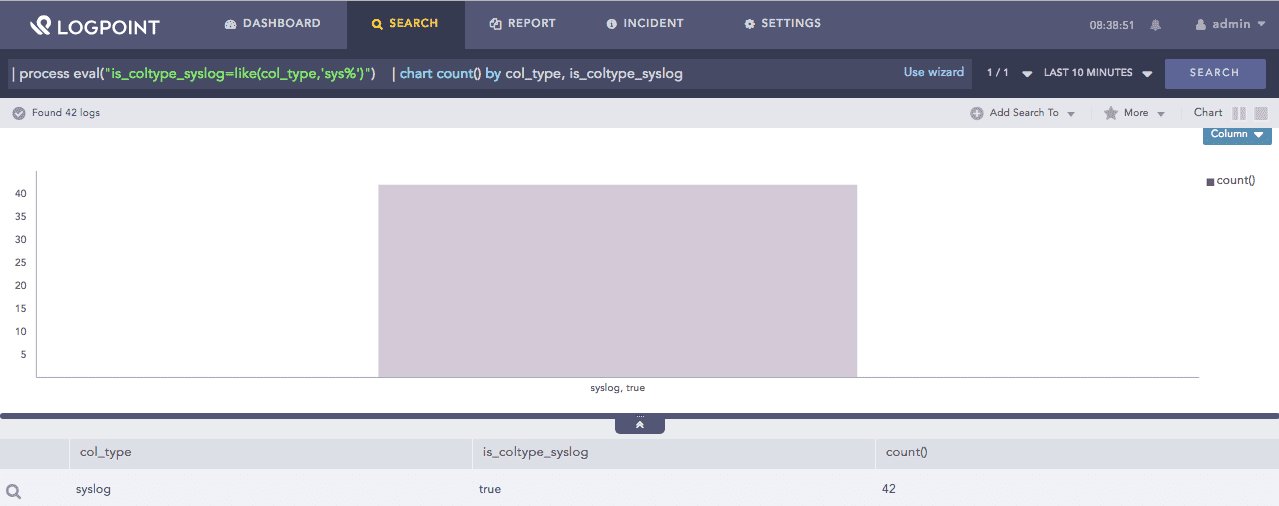
| process eval("is_coltype_syslog=like(col_type,'sys%')")
| chart count() by col_type, is_coltype_syslog
The above example compares the sys% pattern with the value in the col_type field. It returns true in the is_coltype_filesystem identifier if the sys% pattern is an exact match or is a substring of the value of col_type field, else returns false.
The chart count() command displays the count of the combination of col_type and is_coltype_syslog values as a chart and in a tabular form.
Like function
This function returns null. You use the null function in combination with other functions. You use this function in case you do not want any value returned in the user interface. Unlike other functions, this function does not take any argument.
Syntax:
| process eval("identifier=null()")
Example:
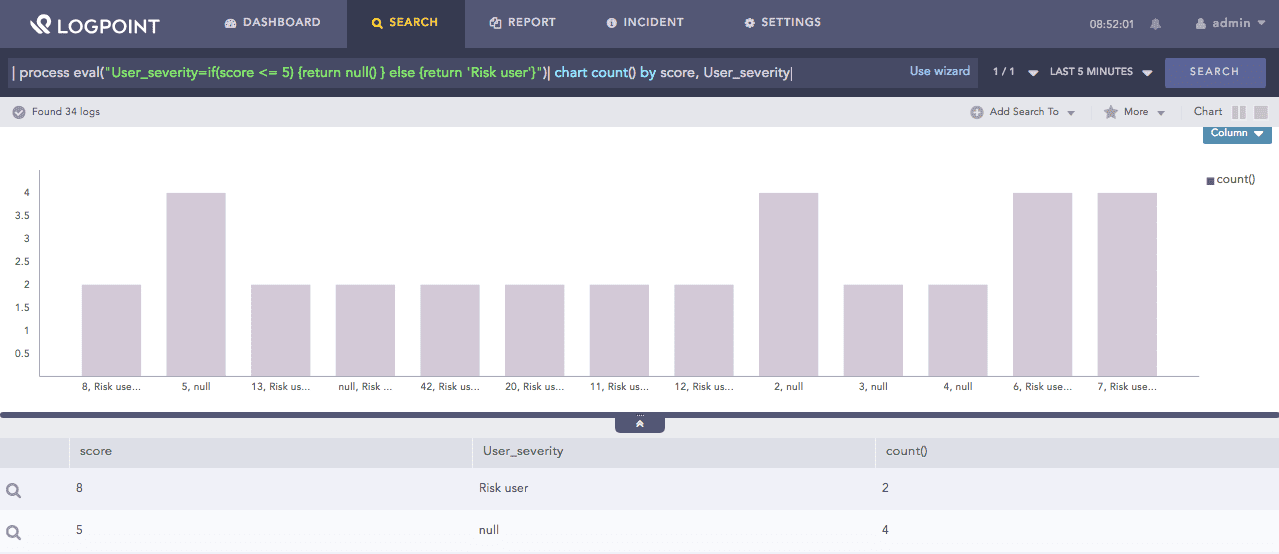
| process eval("User_severity=if(score <= 5) {return null() } else {return 'Risk user'}")
| chart count() by score, User_severity
The above example returns null in the User_severity identifier if the value of the score field is less or equal to 5, else returns Risk user.
The chart count() command displays the count of the combination of score and User_severity values as a chart and in a tabular form.
Null function
This function compares two arguments, X and Y. If X = Y, it returns null, else returns the value of X.
Syntax:
| process eval("identifier=nullif(X, Y)")
Example:
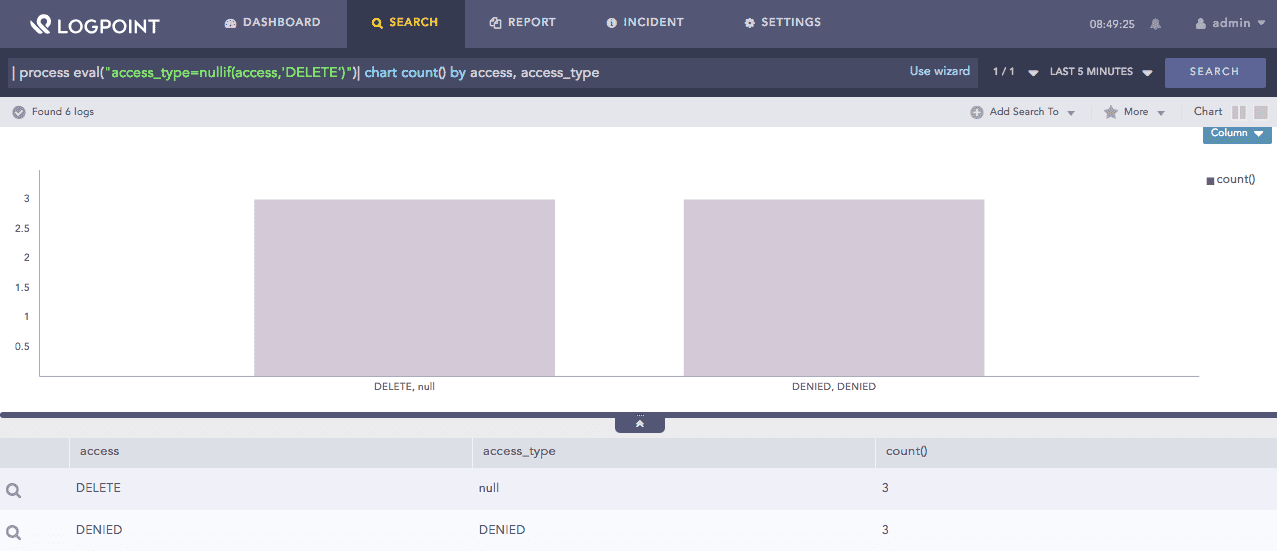
| process eval("access_type=nullif(access,'DELETE')")
| chart count() by access, access_type
The above example returns null in the access_type identifier if the value of the access field is DELETE, else returns the value of the access.
The chart count() command displays the count of the combination of access and access_type values as a chart and in a tabular form.
Nullif function
This function accepts a string field X as input. It returns True if the value of X matches the event type, else returns False. You can use the pipe ( | ) symbol to separate multiple values of X.
Syntax:
| process eval("identifier=searchmatch(X)")
Example:
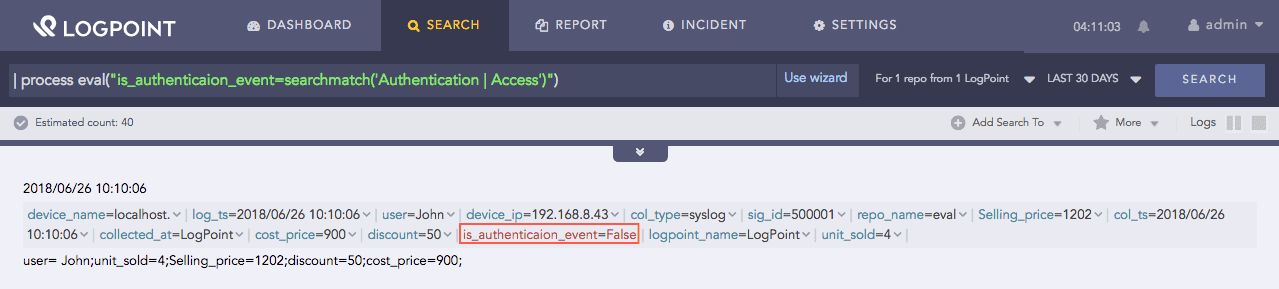
| process eval("is_authenticaion_event=searchmatch('Authentication | Access')")
The above example returns null in the is_authentication_event identifier if the value of the access field is DELETE, else returns false.
Searchmatch function
This function returns True. It is often used in combination with other functions to represent a condition that is undoubtedly true, i.e., 1==1. Unlike other functions, this function does not take any argument.
Syntax:
| process eval("identifier=true()")
Example:
| process eval("is_profit=if(Selling_price > cost_price) {return true()} else {return false()}")
| chart count() by Selling_price, cost_price, is_profit
The above example returns true in the is_profit identifier if the value of the Selling_price field is greater than the value of the cost_price field, else returns false.
The chart count() command displays the count of the combination of Selling_price, cost_price, and is_profit values as a chart and in a tabular form.
True function
This function accepts three arguments X, Y, and Z and returns True if the value of X is within Y separated by a delimiter Z. If X is not listed, the function returns False. In the absence of a delimiter, the comma is a default delimiter.
Syntax:
| process eval("identifier=contains(X, Y, Z)")
Example:
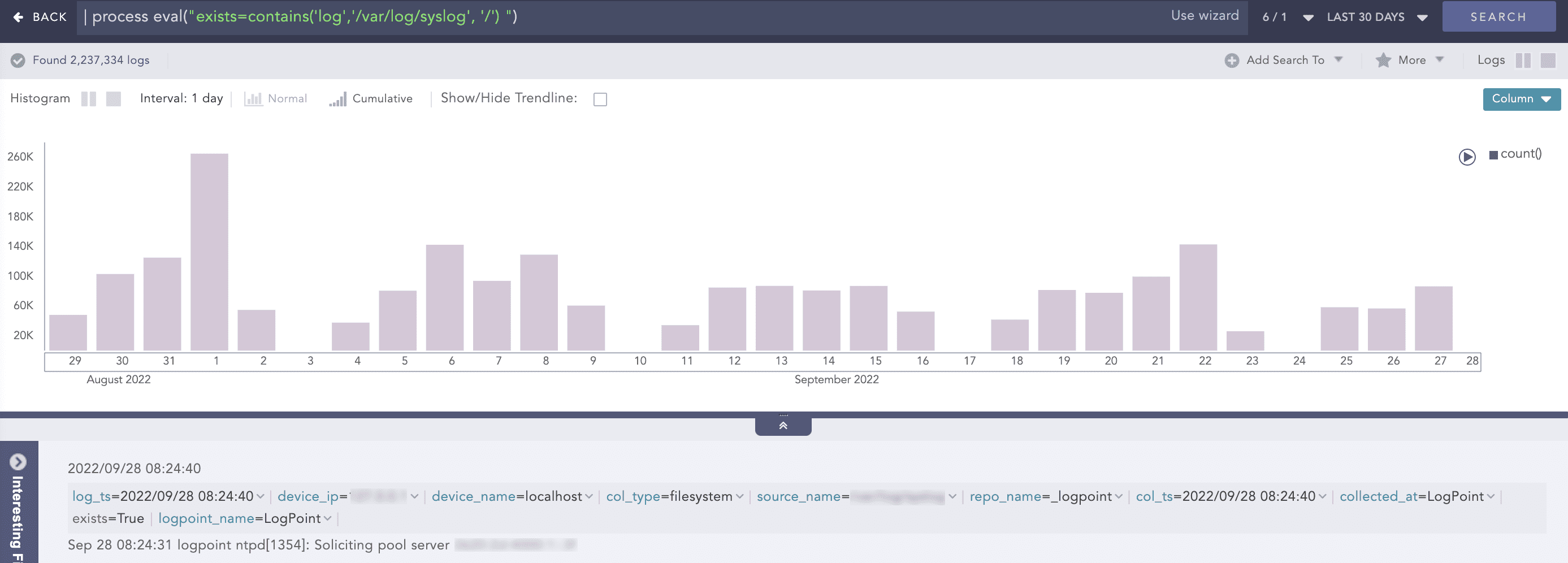
| process eval("exists=contains('log','/var/log/syslog', '/') ")
The above example returns true in the exists identifier if the log string is within /var/log/syslog string separated by / delimiter. If the log string is not listed, the function returns False.
Contains function